Recover a corrupted .aup4 or .aup3 project
Error code 11, error code 101, or a crash before you saved — the recording is almost always still inside the file. This page checks the database, finds the newest usable copy of the project, fills the gaps, and hands the audio back. Nothing is uploaded.
Can a corrupted Audacity project be recovered?
Usually a large part of it, yes. Audacity stores audio in immutable blocks and never rewrites one, so damage tends to hit the database structure or the project document rather than the audio itself. Recovery means finding a document that still decodes — the saved one, the autosave copy, or an earlier generation Audacity 4 keeps in the file — listing which blocks can still be read, and rebuilding a project from those. Blocks that are genuinely gone become silence, and the report says exactly how much.
Drop the damaged project, or the .aup4unsaved / .aup3unsaved file Audacity left behind.
The integrity check runs on your machine and reports what survived.
Play the recovered mix and export it, free.
Pro rebuilds a clean project Audacity opens, or rolls back to an earlier save.
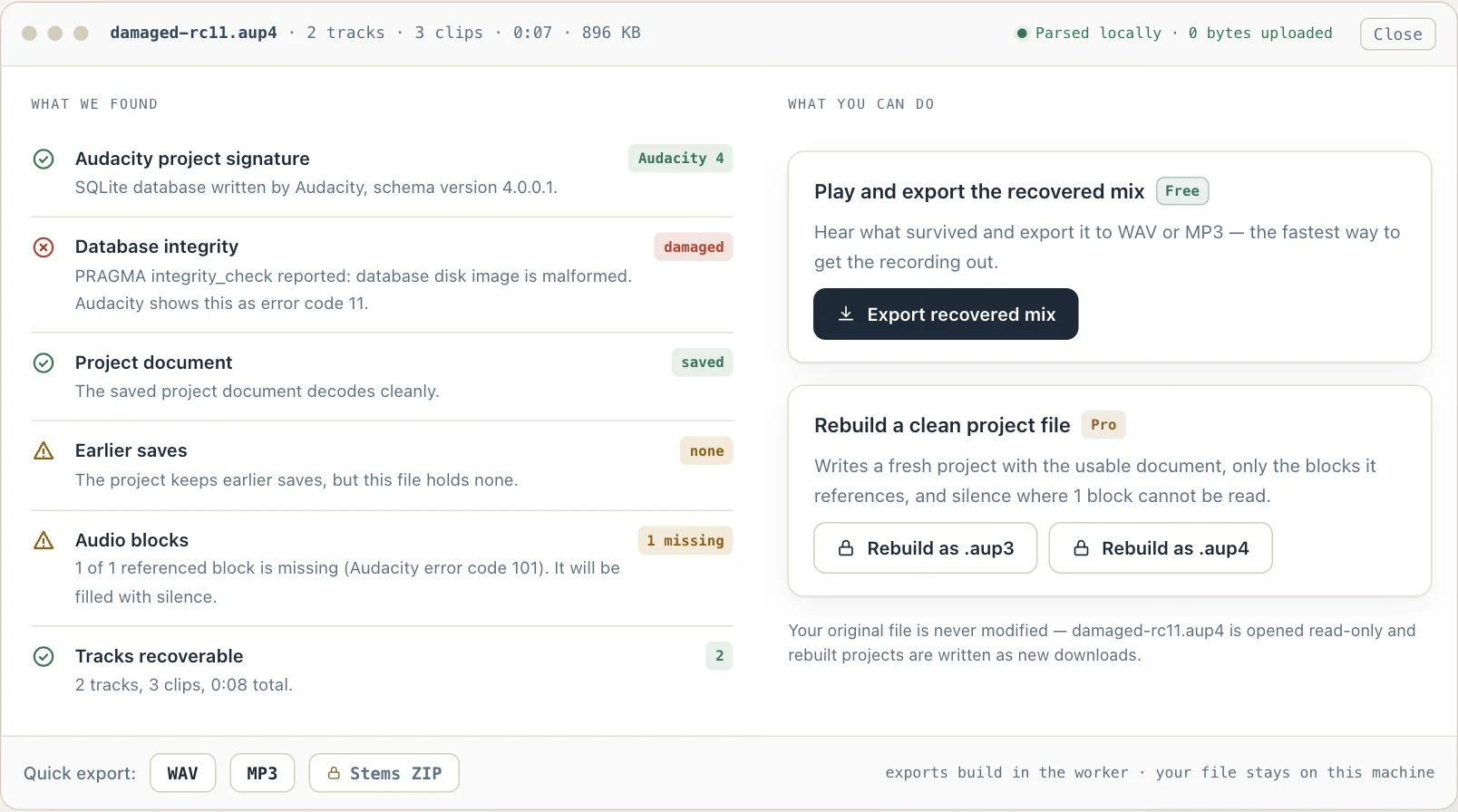
What the recovery report looks like
An unretouched screenshot of this site in Chrome 154 on macOS 27, 7 October 2026. The project in it is a test file from Audacity's own source repository — the same file this site's automated tests open.
Recover a corrupted .aup4 or .aup3 project
Audacity's own recovery utility, audacity-project-tools, is a terminal program. It gained a macOS build in January 2026 and .aup4 support in v1.0.6 on 7 October 2026, its support article asks for roughly four times the project's size in free disk space, and it reaches the earlier saves Audacity 4 keeps inside the file one at a time, by a number you pass it (-history=N). This page runs the same sequence of checks in the browser: the SQLite integrity check first, then a fallback from the saved document to the autosave copy and on to the earlier saves Audacity 4 keeps inside the file, then a census of which audio blocks can actually be read.
Checking the project, playing what survives and exporting it are free; rebuilding a clean project file and rolling back to an earlier save are Pro.
On a Mac? Audacity's own recovery utility only gained a macOS build in January 2026, and it is still a terminal program that asks for about four times the project's size in free space. Everything on this page runs in the browser instead, on any operating system.
How an Audacity project breaks, and what is left
A project is an SQLite database, and SQLite reports two failures Audacity surfaces by number. Error code 11 means the database structure itself is damaged: a page that should hold part of a B-tree does not, usually after a crash mid-write, a full disk, or a drive disconnected before the write was flushed. Error code 101 means the structure is fine but a row the project points at is not there.
Underneath both, the audio is unusually resilient. Audacity never updates a sample block — every edit writes new blocks and repoints the document — so blocks that were written successfully stay valid even when later writes failed. It is common for the whole recording to be readable in a file Audacity refuses to open.
There are also up to three chances at the document. `project` holds the last save; `autosave` holds the copy written after every edit, which is what Audacity offers to restore after a crash; and Audacity 4 added `project_history`, a handful of earlier saves kept so a bad document can be rolled back. Recovery tries them in that order and reports which one it used.
Rebuilding writes a fresh database with the chosen document and only the blocks it references, so unused blocks left over from editing are dropped at the same time. References to blocks that cannot be read are rewritten as silent runs, which is how Audacity itself represents silence — a non-positive block id meaning that many samples of nothing.
One refusal is not damage at all. Audacity 4.0.0 on Windows decodes a project path handed to it on the command line with the system ANSI code page rather than UTF-8, so a name or folder with Cyrillic, Japanese, Hebrew or accented characters is mangled before the file is ever opened, and Audacity reports it as unreadable or not found. It happens to an .aup3 opened for conversion as much as to a saved .aup4. The integrity check here passes on such a file, because the database was never touched — the parser fix, Audacity pull request 11985, was merged into master on 15 September 2026 and the maintainers' wider code-page fix, pull request 12115, on 17 September, and both shipped in Audacity 4.0.1 on 30 September.
- Not corruption
- Audacity 4.0.0 on Windows fails on paths with non-ASCII characters (fixed in 4.0.1, 30 Sep 2026: PR 11985 and PR 12115)
- Error code 11
- Database structure damaged — a page failed to read
- Error code 101
- A referenced sample block row is missing
- Document copies
- project · autosave · project_history (Audacity 4)
- Audio durability
- Blocks are immutable; written blocks stay valid
- Gaps
- Unreadable blocks become silent runs, and are counted in the report
- Compaction
- Blocks no clip references are dropped from the rebuilt file
- Official tool
- audacity-project-tools — terminal only; macOS build since v1.0.5 (January 2026); .aup4 since v1.0.6 (October 2026)
- Companion files
- <name>-wal holds edits not yet copied into the project; -shm is the log's index. Keep them with the project; a clean close merges and removes them. Dropped with the project here, the -wal's committed edits are applied
New to the format? What an .aup4 file is, table by table — and how it differs from .aup3.
Sources
Where the facts on this page were checked. Audacity's code is cited at the tagged release it was read from.
- audacity-project-tools README (Audacity) — Error codes 11 and 101 as Audacity reports them, the recovery command order (-drop_autosave, -check_integrity, -recover_db, -recover_project, -compact), and that Audacity never updates a block. -history=N (Audacity 4 only) takes snapshot N from project_history instead of the project and autosave tables.
- audacity-project-tools v1.0.5 release notes — macOS support arrived in this release on 27 January 2026, with the supported project version raised to 3.7.
- audacity-project-tools v1.0.6 release notes — Audacity 4 project support, with -history and -extract-thumbnail (Audacity 4 only), released on 7 October 2026.
- AudacityDatabase.cpp in audacity-project-tools — MaxSupportedVersion is 4.0.0.1 since v1.0.6 (3.7.0.0 for a file named .aup3); a project whose major version is neither 3 nor 4 is reported as a broken user_version and given that ceiling, and the recovered copy is written with it.
- Audacity support: Recovering corrupted projects — The four-times-the-project-size free disk space guidance and the 15–30 minutes per GB estimate. The article still says macOS is not supported, which the v1.0.5 release superseded.
- SQLite result codes — 11 is SQLITE_CORRUPT, the database disk image is malformed. 101 is SQLITE_DONE, what a query returns when no row matches — which is why Audacity reports it for a missing block.
- SqliteSampleBlock.cpp, Audacity 3.7.9 — Silent blocks are encoded with a non-positive block id, the representation a rebuilt project uses for audio that could not be read.
- Audacity pull request 11985: decode command-line arguments as UTF-8 — Why Audacity 4.0.0 on Windows cannot open a project whose name or folder path has characters outside the ANSI code page: the command-line parser decoded the path with fromLocal8Bit instead of UTF-8, which on Windows in Qt 6 is the system code page. Double-clicking a project, the single-instance handoff, and opening a project while another is open all go through that parser; macOS and Linux are unaffected. Approved by a maintainer on 10 September 2026 and merged into master on 15 September (merge commit e24c106), and shipped in Audacity 4.0.1 on 30 September, whose command-line parser decodes with fromUtf8. Its second commit fixes a separate read of freed memory on the same open path: DBConnection::OpenStepByStep took a char pointer from a temporary UTF-8 copy of the path that was released before sqlite3_open read it — an owning buffer on Windows and macOS, where wxString is not UTF-8 internally, as the pull request notes.
- Audacity issue 12004: accented characters in the project path — An accented letter in a parent folder alone (D:\Téléchargements) makes Audacity 4.0.0 report the project as not found or not readable, on an already-converted .aup4 as well as on one converted from .aup3.
- Audacity issue 11973: Cyrillic project name fails on the first try — The dialogs users see — "Unable to read file" and "Failed to open database file" — and the report that the same project opened on a second attempt, which the fix attributes to File → Open with no project open bypassing the command-line parser.
- Audacity issue 12124: an .aup3 with a Japanese name fails in Audacity 4 on Windows 11 — The refusal is not specific to .aup4: an existing .aup3 named 録音テスト.aup3 could not be opened, its path shown garbled in the error dialog, while the same file renamed to test.aup3 opened and converted. A maintainer asked the reporter to try a build of pull request 12115.
- Audacity pull request 12115: fix codepage conversion issues — The maintainers' own Windows code-page fix, opened 10 September 2026 and approved 11 September: input device names, metadata fields, translated undo entries, the recent-files records written after opening a project from a non-ASCII path, export error messages, effect preset names and the ffmpeg path. It does not touch the command-line parser, which pull request 11985 changes. Merged into master on 17 September 2026 (merge commit df54269); its last commit, added that day and titled "Fix a crash when canceling a recovery", changes ProjectFileIO::LoadProject so a project with no saved document and no usable autosave is marked temporary and keeps its file name instead of leaving the connection uncommitted. Shipped in Audacity 4.0.1 on 30 September 2026.
- Audacity 4.0.1 release notes — Released 30 September 2026. Its bug fixes include opening projects and files with non-ASCII characters in their name or folder (issues 11973, 11976, 12004 and 12057) and other non-ASCII text issues on Windows — the release that carries both pull requests above.
- DBConnection.cpp, Audacity 3.7.9 — The project connection is configured with journal_mode = WAL and wal_autocheckpoint = 0, so SQLite never checkpoints on its own; Audacity installs a WAL hook that wakes its own thread to run passive checkpoints, forces a truncating checkpoint when the connection closes ("moves data from wal to main project file"), and when a checkpoint fails with a full disk shows "Disk is full" naming the <name>-wal file. Audacity 4.0.0 carries the same code under au3/libraries/au3-project-file-io.
- ProjectFileIO.cpp, Audacity 4.0.0 — AuxiliaryFileSuffixes lists the companion files Audacity renames and deletes with a project: -wal always, -shm only on Windows (NO_SHM is defined on every other platform). MoveProject moves them with the project because they "might yet exist, as when checkpointing failed for limited space on the drive … or else lose data", and the Audacity 4 thumbnail reader opens a project with immutable=1 precisely so that no -wal or -shm is created.
- SQLite: Write-Ahead Logging — When the last connection closes it checkpoints and deletes the WAL and its shared-memory file; a database separated from its WAL file can lose committed transactions or be corrupted; the WAL is part of the database's persistent state and must travel with it; and the first connection after a crash runs recovery.
- SQLite database file format, section 4: the write-ahead log — How a -wal is read when it is dropped with the project: a 32-byte header (magic, format 3007000, page size, two salts, a checksum of its first 24 bytes), then frames of a 24-byte header and one page; a frame is valid only if its salts are the header's and its checksum continues the chain from the header through every earlier frame, and a frame that commits a transaction carries the database size. Recovery uses the valid frames up to the last commit frame and ignores the rest.
audacity-project-tools vs Waveward
| audacity-project-tools | Waveward | |
|---|---|---|
| Runs on macOS | Since v1.0.5 (January 2026), from the terminal | Yes, in any modern browser |
| Install needed | Download and run from a terminal | None |
| Free disk space | About four times the project size, per Audacity's support article | None beyond the download you save |
| .aup4 projects | Since v1.0.6 (7 October 2026) | Read as Audacity 4 projects |
| Earlier saves (project_history) | One at a time, by the number you pass with -history=N | Tried newest first; the report says which one decodes |
| Reads the autosave copy | Yes | Yes, and Audacity 4's earlier saves too |
| Shows what survived first | Command output after the run | A report before you commit to anything |
| Cost | Free | Free to check and export; rebuilding is Pro |
Recovering a project
Q. Audacity 4.0.0 on Windows says it cannot read or find my project. Is it corrupted?
Often it is not. Audacity 4.0.0 on Windows cannot open a project whose file name or folder path contains characters outside the system's ANSI code page — Cyrillic, Japanese, Hebrew, or an accented letter in a parent folder such as Téléchargements. Its command-line parser decodes the path with that code page instead of UTF-8, so double-clicking the file, or opening it while another project is already open, looks for a mangled name that does not exist and reports the file as unreadable or missing. An .aup3 you open in Audacity 4 hits the same wall before it is even converted: in issue 12124 a project named 録音テスト.aup3 failed on Windows 11 and the same file, renamed to test.aup3, opened and converted. The parser fix, pull request 11985, was merged into Audacity's master branch on 15 September 2026, and the maintainers' own code-page pull request 12115 — which repairs the recent-files entries, metadata fields, export error messages and preset names that the same decoding corrupts, but not the parser — followed it into master on 17 September. Both shipped in Audacity 4.0.1 on 30 September 2026, whose release notes list "Fixed opening projects and files with non-ASCII characters in their name or folder", so updating to 4.0.1 is the cure. If you stay on 4.0.0, move the project to a folder with plain ASCII names, or — per the fix's analysis of the report where a second attempt succeeded — start Audacity with nothing open and use File → Open. macOS and Linux are not affected. This page reads the project from its bytes and never looks at the path, so dropping the file here shows within seconds whether the database is actually damaged.
Q. Which errors can this recover from?
The two Audacity reports most often: error code 11, where the database structure is damaged, and error code 101, where a sample block the project references is missing. Also unsaved projects after a crash, and a saved document that no longer decodes while an autosave or an earlier save still does.
Q. What cannot be recovered?
Audio in blocks that were never written to disk — a drive that filled up mid-recording, or a file truncated by a failed sync. Those gaps become silence, and the report says exactly where they are.
Q. My old Audacity 2 project (.aup) is missing some of its .au block files. Can the rest be saved?
Yes, everything that is still there. Drop the folder that holds the .aup and its _data folder, or a .zip of it, on the AUP to MP3 page. Every block file that arrived is read; each one that did not plays and exports as silence for the length the .aup gives it, and the page says how many of how many block files were not found. A block that points at audio imported without being copied into the project is named by that original file, whose audio was never in the folder. An .aup project has no database, so the integrity check, rebuild and earlier saves on this page apply to .aup3 and .aup4 files only.
Q. Is my original file changed?
No. It is opened read-only and every rebuilt project is written as a new download.
Q. There are -wal and -shm files next to my project. Can I delete them, and does this page read them?
Do not delete the -wal file, and if you move or copy the project, take it along. Audacity opens a project in SQLite's write-ahead-log mode with automatic checkpointing switched off, so every edit is committed to <name>-wal first and Audacity's own background thread copies it into the .aup4 or .aup3 in passes; the last pass runs when the project closes, and SQLite then deletes the -wal and the -shm index. A -wal still sitting beside a project means Audacity has it open, was killed or crashed with it open, or could not finish copying — a full disk is the case Audacity's code reports by name. SQLite's documentation is blunt about what separating the two costs: committed transactions can be lost. This page reads the -wal when you drop it together with the project, or drop the folder that holds both: every transaction committed to it is applied the way SQLite applies a log when Audacity next opens the project — a frame counts only when its salts and running checksum match the log's header, and a transaction whose commit frame never reached the disk is left out, as SQLite leaves it out — so the report checks the project as Audacity would see it. Neither file is changed. Nothing ties a -wal to its project except the name, so a log left beside another copy of the project passes every one of those checks and then makes the project unreadable — SQLite would apply it just the same; when that happens here the -wal is set aside and the project opens as last saved, with a note saying so. Dropped without its -wal, the project file is shown as it is, without those edits. Dropping the -wal or the -shm on its own is identified as such rather than reported as a damaged project. The -shm file is the shared-memory index SQLite uses to coordinate access to the log; Audacity's own list of files it renames and deletes together with a project is -wal on every platform and -shm on Windows only.
Q. Why is rebuilding a paid step when the export is free?
The export gets your audio out, which is the urgent part. Rebuilding produces a project Audacity opens again with its clips, tracks and structure intact, and that is the part that takes real work to get right.
Free to open, play and export the stereo mix for projects up to 256 MB; larger projects still open and play free, and downgrading to .aup3 is free up to the same size. Recovery, per-track stems, and exports or downgrades above that size are a one-time $19 license — no subscription, no recurring fees.
Every job an Audacity project needs
Same local-first engine, one page per task.