Open an .aup4 project in Audacity 3 again
Audacity 4 converts a project the moment it opens it, and cannot save it back. If you need Time Tracks, MIDI tracks, the Mixer, Macros, or a plugin Audacity 4 does not host yet, downgrade the project here. Only the version stamps and the Audacity 4 fields change; every audio sample is copied untouched.
Why won't Audacity 3 open my .aup4 file?
Audacity 3.7 checks two version stamps before it reads a project. The SQLite database carries the Audacity version that wrote it, and the project document carries a file-format version — Audacity 4 writes 2.0.0 while 3.7 accepts at most 1.3.0. Either being newer stops the load with "You may need to upgrade to a newer version to open this file". Everything else about the file is the same design in both versions, which is what makes a downgrade possible: rewrite the two stamps, drop the few fields 3.7 has never seen, and it opens.
Drop the .aup4 project — it is analysed on your machine.
Read the report: exactly which fields change and which are dropped.
Play the mix free to confirm it is the right project.
Download the .aup3 — free for projects up to 256 MB — and open it in Audacity 3.7.9 or newer.
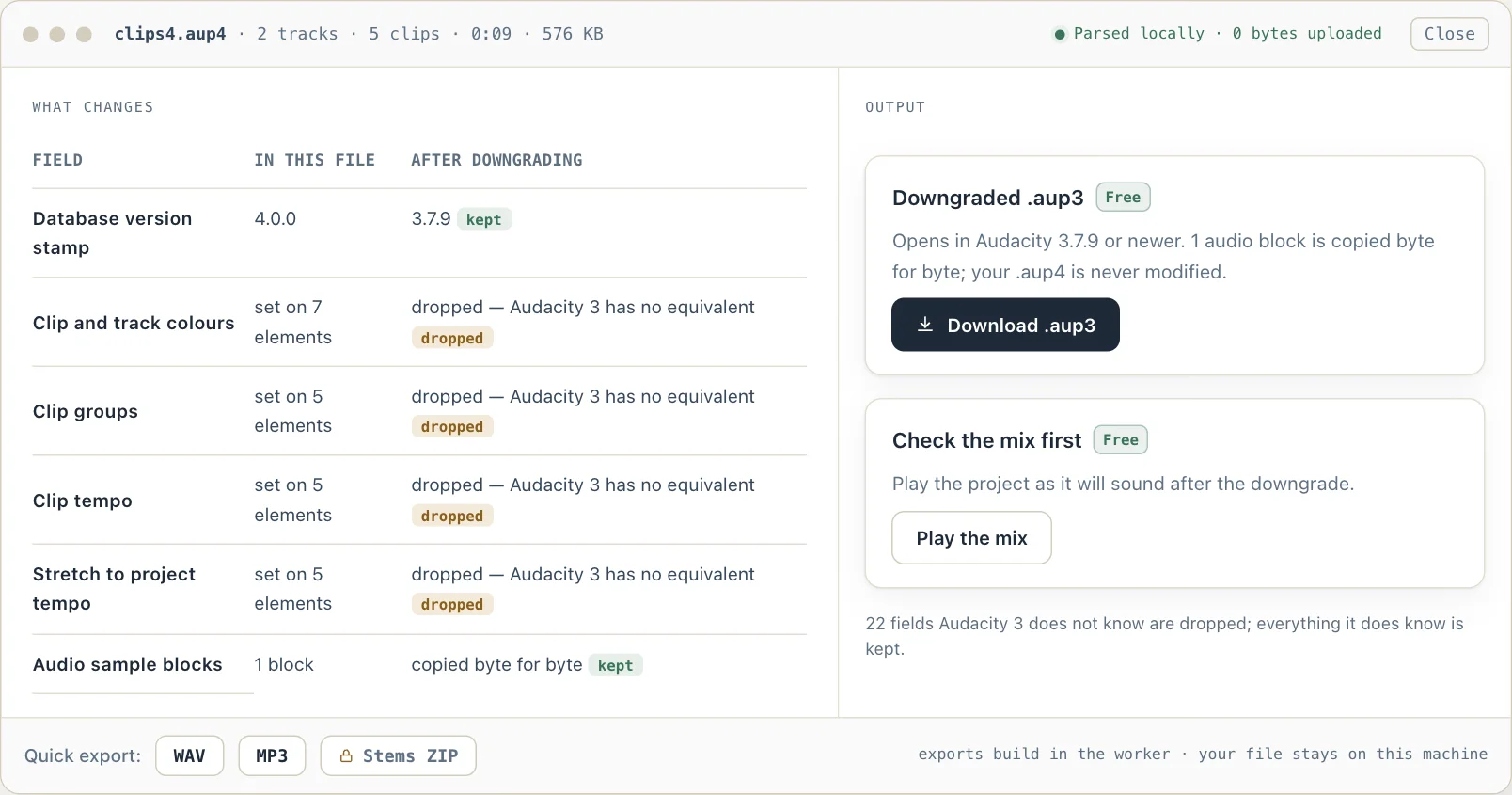
What the downgrade view looks like
An unretouched screenshot of this site in Chrome 154 on macOS 27, 7 October 2026. The project in it is a test file from Audacity's own source repository — the same file this site's automated tests open.
Open an .aup4 project in Audacity 3 again
Audacity 4.0 is a rebuild on a new UI toolkit, and its own release notes list what did not make the first version: Time Tracks, Note and MIDI tracks, the Mixer, the Macro Manager and scripting pipe, VAMP and LADSPA plugin hosting, and Play-at-speed. The developers say those are coming back. Until they do, anyone who opened an old project in Audacity 4, saved it, and later needed one of them is stuck — the project is .aup4 now, and Audacity 3.7 refuses it.
This page rewrites the two version stamps 3.7 checks, drops the handful of fields it has never seen, and copies the audio blocks unchanged.
On a Mac? Audacity's own recovery utility only gained a macOS build in January 2026, and it is still a terminal program that asks for about four times the project's size in free space. Everything on this page runs in the browser instead, on any operating system.
The two gates, and what changes to pass them
The first gate is the SQLite header. Audacity stores the version that wrote a project in the database's `user_version` field, packed as four bytes — major, minor, revision, modification level. On open, Audacity compares it with its own version and refuses anything newer, because it cannot know what a future schema contains. A downgrade rewrites that field to 3.7.9.
The second gate is inside the document. The root `project` element carries a `version` attribute holding the XML schema version, which is a separate number from the application version: Audacity 3.7 writes and accepts 1.3.0, Audacity 4 writes 2.0.0. If the document's version is higher than the running build's, the load stops before any track is read. A downgrade rewrites that attribute, and the `audacityversion` attribute alongside it.
Then there are the fields. Audacity 4 writes clip groups, a per-clip tempo, a stretch-to-project-tempo flag and a per-clip selection flag, none of which Audacity 3 has a reader for; pre-release Audacity 4 builds also wrote colour as a hex string, where the release, like Audacity 3, writes a palette index. Audacity 3.7 ignores attributes it does not recognise rather than failing, but a downgraded project should not claim to hold data the format cannot express, so those are removed and listed in the report.
Nothing else is touched. The `sampleblocks` rows — the audio, its per-block summaries and its sample format — are copied across exactly, which is why the downgraded file is the same size as the original and sounds identical.
- Gate 1
- SQLite user_version — rewritten to 3.7.9
- Gate 2
- Document version attribute — rewritten from 2.0.0 to 1.3.0
- Dropped
- Clip groups, clip tempo, stretch-to-tempo, clip selection; hex colour strings from pre-release builds
- Kept
- Clip offsets, trims, envelopes, volume, pan, effect chains, track names
- Audio
- Sample blocks copied byte for byte, including summaries
- Opens in
- Audacity 3.7.9 or newer
- Original file
- Never modified — the downgrade is written as a new file
New to the format? What an .aup4 file is, table by table — and how it differs from .aup3.
Sources
Where the facts on this page were checked. Audacity's code is cited at the tagged release it was read from.
- ProjectFileIO.cpp, Audacity 3.7.9 — Gate 1: a user_version newer than the running build is refused with "This project was created with a newer version of Audacity". Gate 2: a document version above AUDACITY_FILE_FORMAT_VERSION 1.3.0 stops the load with "You may need to upgrade to a newer version to open this file".
- ProjectFileIO.cpp, Audacity 4.0.0 — Audacity 4 writes 2.0.0 as the document version.
- ProjectFileIO.cpp, Audacity 4.0.1 — Audacity 4.0.1 still defines AUDACITY_FILE_FORMAT_VERSION as "2.0.0" and writes it as the document version.
- Audacity 4.0.1 release notes — Released 30 September 2026; the features and fixes it lists include no way to save or export a project as .aup3.
- WaveClip.cpp, Audacity 4.0.0 — The clip attributes Audacity 4 writes and a downgrade drops: groupId, clipTempo, clipStretchToMatchTempo and isSelected. Colour is written as a colorindex palette entry, as in Audacity 3.
- Audacity 4.0.0 release notes — "Converted projects cannot be saved back to .aup3", and the list of what is not in 4.0: Time Tracks, Note/MIDI tracks, the Mixer, the Macro Manager and scripting pipe, VAMP and LADSPA plugin hosting, Play-at-speed.
- audacity/audacity issue #8841 — An Audacity contributor's tracker issue from May 2025 stating that backwards compatibility from Audacity 4 to Audacity 3 is not planned.
Downgrading a project
Q. Can Audacity 4 save or export a project as .aup3?
No. Audacity 4 converts an .aup3 forward when it opens it, its 4.0.0 release notes say a converted project cannot be saved back to .aup3, and an Audacity contributor's tracker issue from May 2025 says backward compatibility is not planned. Audacity 4.0.1 (30 September 2026) did not change that: it still stamps the document 2.0.0, which 3.7 refuses, and its release notes add no way back. Rewriting the file here is that way back — free for projects up to 256 MB.
Q. Will I lose audio?
No. The sample blocks are copied byte for byte, and clip positions, trims, envelopes, volume and pan are kept. Only the fields Audacity 3 has no reader for are dropped, and the report lists each one.
Q. Which Audacity 3 version do I need?
3.7.9 or newer. The downgraded file is stamped as a 3.7.9 project, so an older 3.x release will ask you to update first — that is a free download.
Q. What about effects added in Audacity 4?
Realtime effect chains are carried across unchanged. An effect that only exists in Audacity 4 will be reported as missing when Audacity 3 opens the project; the audio underneath is unaffected.
Q. Can I go back to .aup4 afterwards?
Yes. Audacity 4 opens any .aup3 and converts it forward again, as it always does.
Free to open, play and export the stereo mix for projects up to 256 MB; larger projects still open and play free, and downgrading to .aup3 is free up to the same size. Recovery, per-track stems, and exports or downgrades above that size are a one-time $19 license — no subscription, no recurring fees.
Every job an Audacity project needs
Same local-first engine, one page per task.