Open an .aup4 project without Audacity
Drop an Audacity project and listen to it, see every track and clip, and export a WAV or MP3 — on this page, on any machine. The file is read on your own device and never leaves it.
An Audacity 1.x or 2.x project (.aup)? — the .aup and its _data folder together, or drop that folder or a .zip of it above.
Several projects? Drop or choose them together: export them all to one ZIP at once (Pro), or open them one by one free.
Can I open an .aup4 file without Audacity 4?
Yes. An .aup4 file is a single SQLite database: the audio sits inside it as blocks of raw samples, and a compact binary-encoded document describes the tracks and clips. Waveward reads that database in your browser, rebuilds each track from its clips, and plays or exports the result — no Audacity install and no upload. Audacity 3 cannot open .aup4 because its format version is newer than 3.7 accepts; if you need the project back in Audacity 3, use the downgrade tool.
Drop the .aup4 or .aup3 file — it is read locally, with nothing uploaded.
See every track and clip on a timeline and play the mix straight away.
Export the stereo mix to WAV or MP3 free, for projects up to 256 MB.
Pro rebuilds damaged projects, exports per-track stems, and exports or downgrades projects larger than 256 MB.
What it looks like with a project open
An unretouched screenshot of this site in Chrome 154 on macOS 27, 7 October 2026. The project in it is a test file from Audacity's own source repository — the same file this site's automated tests open.
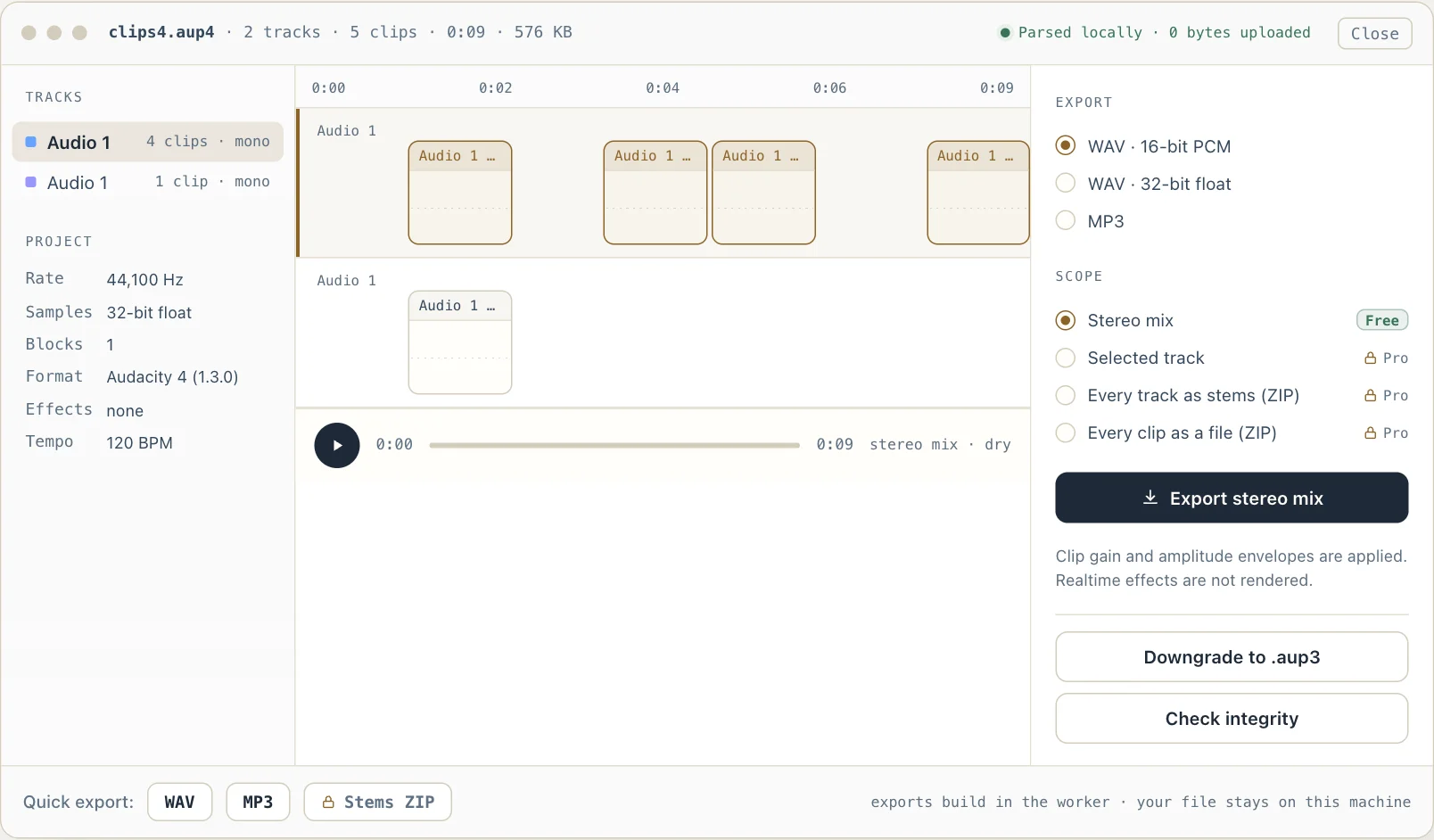
Open an .aup4 project without Audacity
Audacity never saves your recording as something a player can open. It saves a project — .aup4 since Audacity 4.0, .aup3 in Audacity 3 — and until now only Audacity itself could read one. Send a project to a collaborator, open it on a Chromebook, or find it on an old drive after the app is gone, and there was no way in.
Waveward reads both formats directly in your browser, rebuilds the timeline the way Audacity draws it, and lets you play the result or export it. Opening, listening, exporting the stereo mix and downgrading to .aup3 are free; recovery and per-track stems are the paid step.
On a Mac? Audacity's own recovery utility only gained a macOS build in January 2026, and it is still a terminal program that asks for about four times the project's size in free space. Everything on this page runs in the browser instead, on any operating system.
What an .aup4 file actually is
Since Audacity 3.0 a project has been one SQLite database file, and Audacity 4.0 kept that design under the new .aup4 extension. Four tables matter: `project` holds the saved project document, `autosave` holds the crash-recovery copy written after every edit, `sampleblocks` holds the audio, and `project_history` — new in Audacity 4 — keeps a few earlier saves so a damaged document can be rolled back.
The audio is stored as immutable blocks of up to about a megabyte, in 16-bit, 24-bit or 32-bit float samples. Audacity never edits a block in place: every change writes new blocks and the document points at them. That is why a project file grows so quickly, and also why the audio is usually intact even when the document is not.
The project document is XML, but stored in a compact binary encoding: a dictionary assigns a two-byte id to every element and attribute name, and the document references those ids. Waveward decodes that token stream, follows each clip to its blocks, applies the clip's offset, trims and amplitude envelope, and mixes the tracks — the same reconstruction Audacity performs when it draws the timeline.
Audacity 4 also raises the document's format version and adds clip fields Audacity 3 has never seen: clip groups, a per-clip tempo, a stretch-to-project-tempo flag, and a per-clip selection flag.
- Format
- One SQLite database file — the same design as .aup3
- Introduced
- Audacity 4.0.0, released 3 September 2026
- Tables
- project · autosave · sampleblocks · project_history
- Audio storage
- Immutable blocks up to ~1 MB; 16-bit, 24-bit or 32-bit float samples
- Project document
- XML in a binary token encoding with a name dictionary
- Opens in Audacity 3?
- No — both the database stamp and the document's format version are newer than 3.7 accepts
- .aup3 → .aup4
- Automatic and one-way in Audacity 4; the original .aup3 is left unchanged
- Realtime effects
- Built-ins (Reverb, Compressor, Limiter, Bass and Treble, Phaser, Wahwah) rendered on Pro exports as Audacity 3.7.9 renders them; plug-ins not
New to the format? What an .aup4 file is, table by table — and how it differs from .aup3.
Before you trust a recording to a website
Q. Does my recording really stay private?
Yes. The project is opened with the browser's File API and parsed in a Web Worker on your own machine. Nothing about it is sent anywhere. To see that for yourself, open the project and then disconnect from the network: playing, WAV export and downgrading keep working. Open it while online, though — the reader is downloaded from this site the first time you open a project — and make MP3s while online too, because the MP3 encoder is downloaded the same way.
Q. My project is several gigabytes. Will it work?
Yes. A project the browser tab can hold is read into memory whole — the file plus SQLite's own copy, roughly twice its size. A larger one, including one past the roughly 2 GB that Chrome and Edge will read into memory at all, is read from the file a piece at a time instead: only the pages being looked up and the audio being played or exported are in memory, so it opens, plays and exports the same way. A 2.08 GB, 104-minute test project opened in about 3 seconds and exported to a 1.03 GB WAV in about 12 seconds in Chrome on a Mac. Read that way, the database integrity check is skipped, and rebuilding or downgrading — which write a new copy of the whole project in memory — work only on a device that can hold it. Exporting a project larger than 256 MB is part of Pro.
Q. Audacity says my project is corrupted. Can you fix it?
Often, yes. The audio blocks usually survive; what breaks is the database structure or the project document. The recovery page runs the integrity check, falls back to the autosave copy or an earlier save kept inside the file, fills gaps with silence, and rebuilds a clean project, in the browser on a Mac as well as on Windows or Linux. Audacity's own audacity-project-tools does the same job from a terminal; since v1.0.6 (7 October 2026) it accepts .aup4 projects, and it restores one of the earlier saves in project_history when you pass that save's number (-history=N), where this page tries them newest first and reports which one decodes.
Simple, one-time pricing
Opening a project, seeing its tracks and playing it are free forever, at any size your browser can hold; exporting the stereo mix and downgrading to .aup3 are free up to 256 MB. Recovery, stems, and larger exports and downgrades are a one-time unlock — no subscription, no recurring fees.
Everything you need to hear and export a project.
- Open .aup4 and .aup3 projects — locally; one too large to hold in memory is read from the file in pages
- Open old .aup projects (Audacity 1.x and 2.x) together with their _data folder
- See every track and clip; play the mix in the browser
- Export the stereo mix to WAV (16-bit or 32-bit float) or MP3, up to 256 MB
- Read the project's facts: sample rate, tracks, clips, blocks, saved-with version
- Downgrade .aup4 to .aup3 so Audacity 3.7 opens it again, up to 256 MB
- Run the integrity check and see the full recovery report
- See a project's labels; download them as Audacity's label file or copy them as timestamps
- See how much of a project file is space Audacity no longer uses
- Files never leave your device
Unlock recovery, stems and large projects for good — a single payment, yours to keep.
- Rebuild a corrupted project into a clean file Audacity opens
- Roll back to an earlier save kept inside the project
- Export every track, or every clip, as separate files in one ZIP
- Split the mix at its labels, or make one MP3 with a chapter per label
- Export a whole batch of projects to one ZIP at once
- FLAC, M4A (AAC) and Opus; any sample rate; loudness to −14, −16 or −23 LUFS
- Render Audacity's built-in realtime effects (Reverb, Compressor, Limiter and more)
- Save a compact copy of a project, without the space Audacity left unused
- Export or downgrade projects larger than 256 MB
- Lifetime license — no renewals
Every job an Audacity project needs
Same local-first engine, one page per task.